
Basics of Python
At this point you should have VS Code and Python installed on your computer, if that is not the case check out Getting Started with Data Science (Part I) in this series.
A brief primer on Python
In general there are two types of programming languages, compiled and interpreted. Compiled languages are written and compiled into an executable file, whereas an interpreted language is interpreted line by line by the computer as the program is run. In general compiled languages are more complex to write and faster than interpreted languages. Python is an interpreted language, the concept was formed in the late 1980’s and was released in 1991.
The beauty of Python is that it writes and reads in a fairly understandable way, its syntax is easy to pick up, and there are copious amounts of resources in digital and print form.
Setting up to write in python
I am a firm believer that the best way to learn something new is to get to a point where you can see the fruits of your labor early to keep you engaged as you progress. That being said we will try and jump into actual programming as quickly as possible and add in necessary details about the language as they come up.
First thing we need to do is make a folder where we can keep our code organized, somewhere on you computer create a folder and name it whatever you like. Next we will launch VS Code, once launched you will want to open the folder so that any new scripts (what individual Python programs are called) will be stored in that folder.
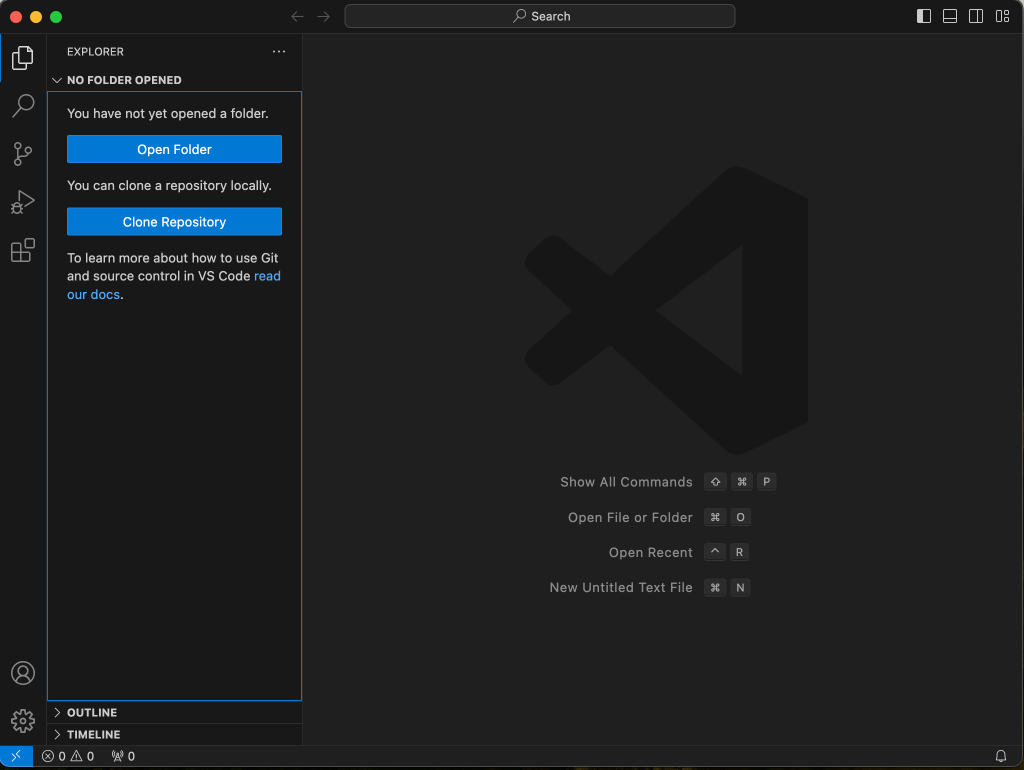
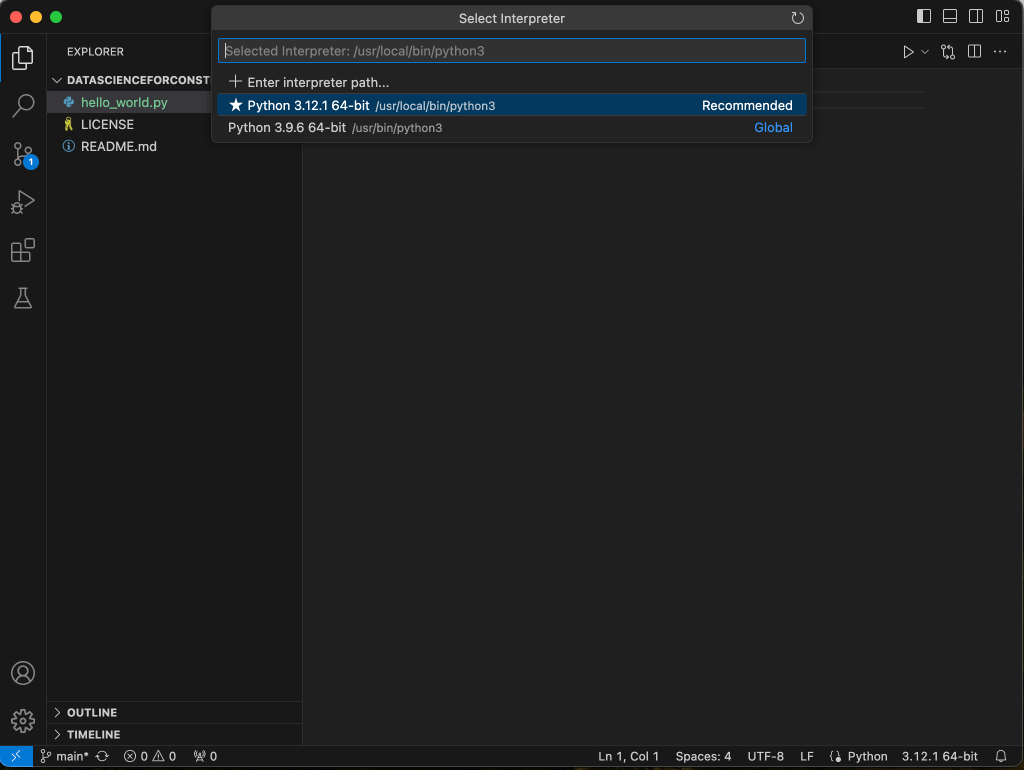
Next let’s create a Python file, in VS Code click the add new file button and name the new file hello_world.py (this is a classic program that almost all languages use as an example and honoring that tradition we will as well). You will possbily notice now at the bottom right hand side of the VS Code application that there is a notification stating to select an interpreter. When we click on that it will bring us to the command palette where we can select the version of Python we have installed.
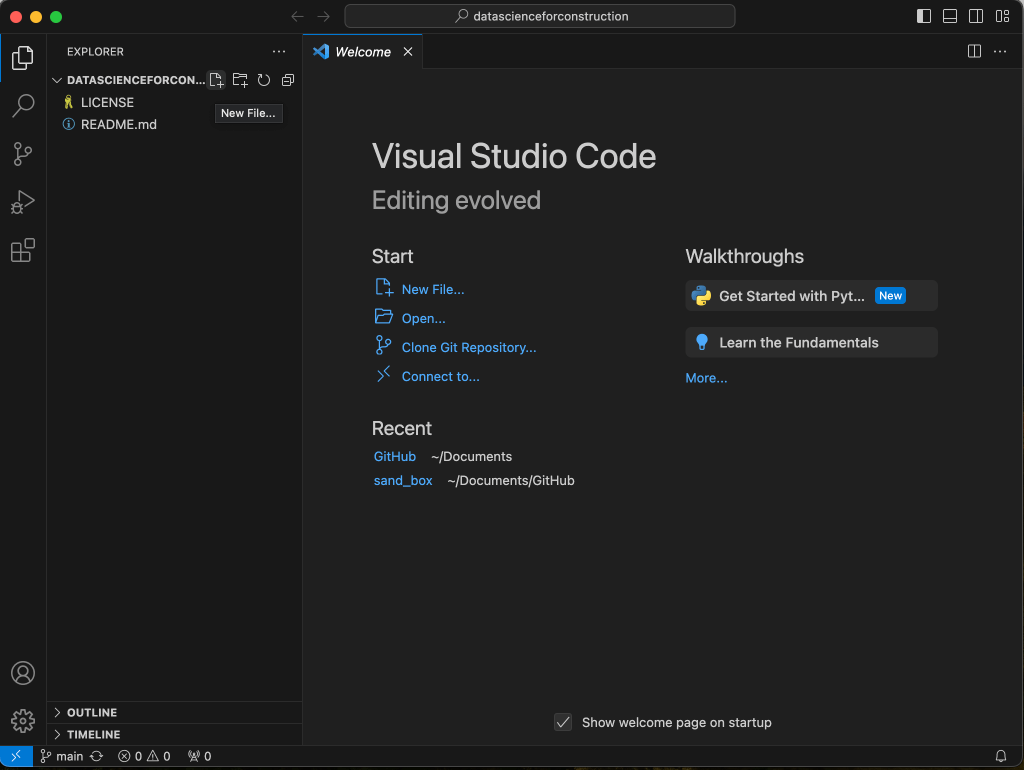
Selecting the recommended interpreter is usually your best option at this point, unless you are sure you know the version you are wanting to use.
Writing our first script
With the hello_world.py file open type in the following code.
print(“hello world”)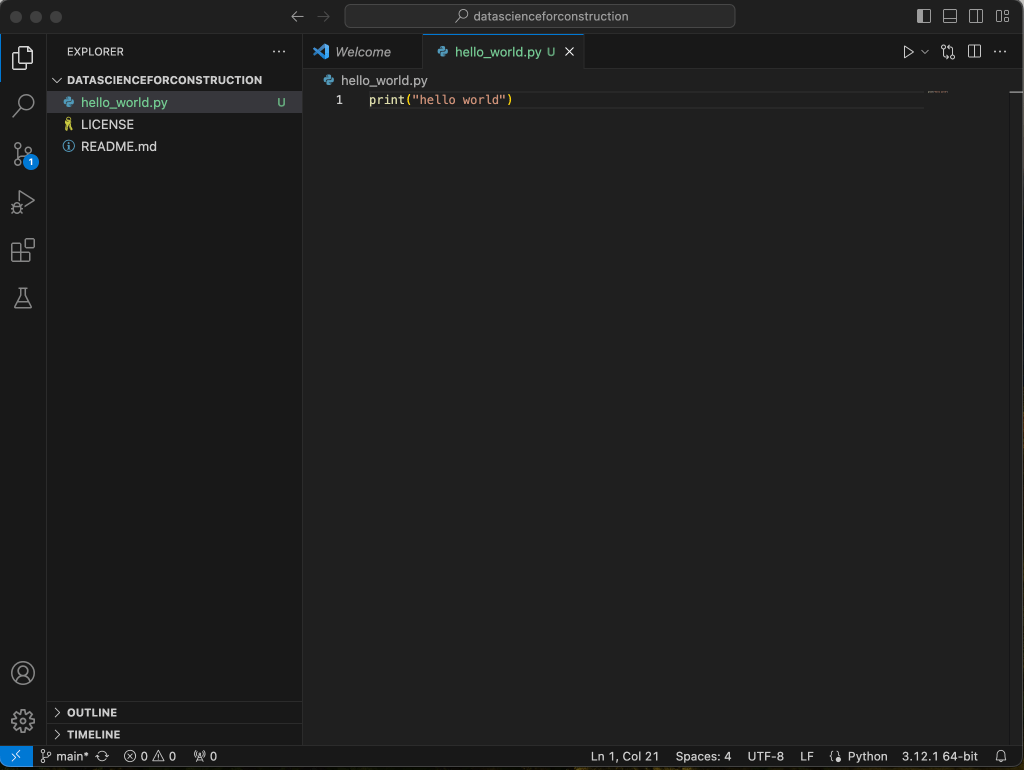
Save the file, (ctrl+s or cmd+s), then in the upper right hand section of VS Code click the run button (this looks like the play button on a TV remote) to run your code. You will see in the bottom pane of VS Code that the code has executed and the words hello world have printed in the terminal.
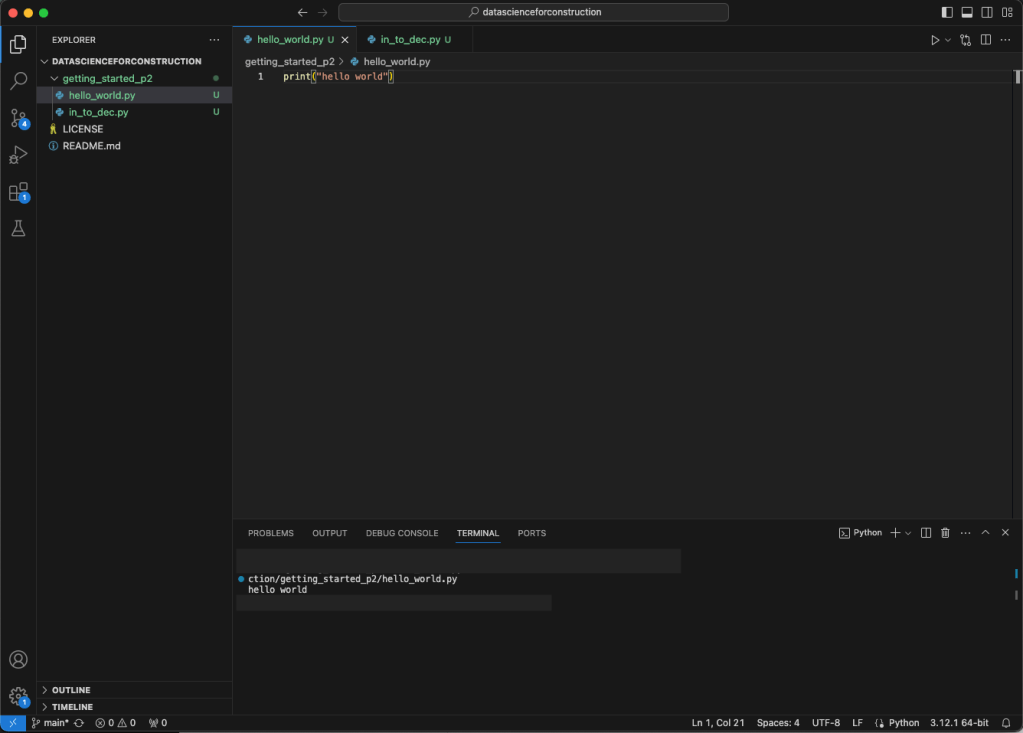
Now let’s execute this code through the computers terminal. Open the command prompt (windows) or terminal (Mac/linux), open the folder where your new Python script is stored, now copy the folder directory (path) as text. You should be able to do this by right clicking on the folder and selecting copy path as text. In the terminal type in the cd followed by the path and hit enter/return. This directs the terminal to run inside that location. Next type in the following command and hit enter/return.
python3 hello_world.pyThe terminal should print out the words hello world, and there you have it, you have written your first code in Python. If you did all this and none of your code ran, don’t be discouraged, check that the interpreter is selected in VS Code and double check the directories. Having code not execute is just part of the learning process.
Diving deeper
So by now you may be thinking that what you did was pointless, or maybe not, maybe you are thinking you just took your first step to learning a new language and created your first computer program. Guess what, you did, its not trivial, in one line you gave a set of instructions to a computer and it took those instructions and executed them for you. This in essence is the root of all programming, you are creating a set of instructions to follow, giving it a recipe to make or create something, the possibilities are endless, your imagination and creativity is the limit here.
Let’s take on a slightly more complicated challenge now and add some more lines of code with some additional instructions. We will add some prompts that allow the script to gather some information form the user and some simple math. First create a new Python file titled in_to_dec.py so the name makes sense we are creating a script that will take an input of feet and inches and convert it to a decimal format.
First we will need to import some libraries into our new python script type in the following at the top of your Python file.
import math
import re
import time
We will get further into libraries and packages later for now think of it as add-on to python that enhance its functionality. These three lines are importing the math library (used to perform basic mathematic functions), the re library (which stands for regular expression and is used to format and parse text), and time function (which handles various functions relating to time). Next write the following four lines of code.
measurement = input("enter measurement")
num = re.findall(r'\d+', measurement)
num_list = list(map(int, num))
list_count = int(len(num_list))
Do not, I repeat, DO NOT let the strangeness of any code block intimidate you, we are going to break it all down. measurement is a variable we have created, we did this by giving it a name (“measurement”), following it with “=” and then giving it a value, in this case the value uses the input() function which will prompt the user to enter a value which is then stored in the variable measurement. We can call or retrieve the value stored in this variable later on and use it.
The next line num = re.findall(r'\d+', measurement)is looking at the variable measurement and finding the numeric items less the ‘, “, and \ that are contained in typical measurements of feet and inches (such as 10’ 2”), it is assigning those numbers to a new variable we called num. Next num_list = list(map(int, num) is mapping those numbers to list as integers, the output will be a list such as [10, 2] (for an input of 10’2″), and assigning the list to a new variable we called num_list. The last line list_count = int(len(num_list) finds the length of the list (in this case 2) as an integer and assigns it to a new variable we called list_count.
Now that we have our variables formatted in a way we can do some math with we will write the portion of our code that will calculate the decimal format of our feet and inch measurement. Write the following five lines of code after the first four.
  base_feet = num_list[0]
  base_inches = num_list[1]
  feet_dec = base_inches / 12
  feet = base_feet + feet_dec
  print(feet)
The first line base_feet = num_list[0] is a variable called base_feet and assigning it the first value of our list which is indicated by the index of the list [0] (a list index starts at 0, most indexes in python use 0 as the starting point). Next we have base_inches = num_list[1] which is another variable called base_inches and it is assigned the second value in our list as referenced by [1]. Now we get to do some math, in the next line feet_dec = base_inches / 12 we are taking the value assigned to our base_inches variable and dividing it by 12 (12 inches to a foot, so the amount of inches divided by twelve will give us our the equivalent of feet in decimal format). Next we have feet = base_feet + feet_dec we have created a new variable and assigned in the value of our feet measurement plus our decimal format of the inches in feet. Finally we use the print() function to display our result using the line print(feet). The complete code should look like the following.
import math
import re
import time

measurement = input("enter measurement")
num = re.findall(r'\d+', measurement)
num_list = list(map(int, num))
list_count = int(len(num_list))

base_feet = num_list[0]
base_inches = num_list[1]
feet_dec = base_inches / 12
feet = base_feet + feet_dec
print(feet)
Go ahead and run the code in VS Code and in the terminal section at the bottom you should see the words enter measurement with a flashing/blinking cursor next to it, you need to click next to the statement to make sure when you enter your input you are entering in the terminal and not in the code itself (trust me I make this mistake often), use standard feet and inches measurement notation such as 10’2” and hit enter/return. This should return the answer of 10.1666667 in the terminal and stop the program.
Loops and logic
The above code helps us a little bit, it would be nice if we could handle fractions and have the program ask for a new input after each answer so we don’t need to restart the program every time we need to use it. To do this we need to add a loop and some logic to our code.
In Python there are two primary types of loop a for loop and a while loop. But first what is a loop, a loop is a function that tells a block of code (set of instruction designed to accomplish a task or sub task), to run more than once depending on a set of conditions. In a for loop our condition is usually a amount of runs (how many times the loop runs through the block of code), say you want to run adding a set of numbers together 10 times, this could use a for loop. A while loop runs until a certain condition is met and then stops. It should be noted that care should be taken with while loops as if the conditions is never met the code can run indefinitely until the user intervenes and cancels the program. For our code we will be using a while loop.
With a basic understanding of loops lets set up our loop for our program. Create a new Python file (at this point you can title it what you’d like, just remember .py is the extension you need to use to tell the system it is a Python script). Same as before import the necessary libraries.
import math
import re
import time
Next add the following five line of code.
stop_program = "stop"

while True:
    measurement = input("enter measurement")
    if measurement == stop_program:
        break
The stop_program = "stop" is a variable containing the word stop, we will use this as our keyword to stop the while loop. Next we have the start of the loop with while True:, this begins our loop everything that is indented underneath the loop is a part of the loop, Python uses indentation as its methods for determining what code is contained in a logical statement or loop. At the top of our loop is the measurement = input("enter measurement") this is the same prompt we used earlier to gather the input we will use to create our feet and inches measurement to a decimal format.
After our input prompt we have an if statement, if measurement == stop_program:, Notice the == instead of =, in Python == means equal to, whereas = is used to assign values to variables, among other things. The if statement is similar to the IF() function in excel with a bit more direct flexibility. In this case we are stating that if measurement equals stop to execute the code block indented below the if statement. Remember we created a variable called stop_program that holds the value “stop”, this is now passed to the if statement so that when the user writes stop when prompted for a measurement it will execute the code block in the if statement. The next line is break which a statement that tells the program to stop, this in turn breaks the while loop.
Add the following four lines after the if statement.
    else:
        num = re.findall(r'\d+', measurement)
        num_list = list(map(int, num))
        list_count = int(len(num_list))
else: is an extension of the if statement, it is stating what to do in the event that measurement does not equal stop. The next three lines are the same as those included in our original program. Directly following this code write the following 11 lines, the if statement here should be indented the same as the list_count line.
        if list_count == 4:
            base_feet_frac = num_list[0]
            base_inches_frac = num_list[1]
            numerator = num_list[2]
            denominator = num_list[-1]
            inch_dec = numerator / denominator
            inches = base_inches_frac + inch_dec
            feet_dec_frac = inches / 12
            #rounds to 2 decimal places
            feet_frac = round(base_feet_frac + feet_dec_frac,2)
            print(feet_frac)
The if statement here if list_count == 4:, is looking at the list made in the previous code block and looking to see if the length is equal to 4. We are doing this because we want to handle fractions so if we input 10’2 3/4″ the re.findall() function would return [’10’, ‘2’, ‘3’, ‘4’], which would then be passed to a list. In this list we would then have index [0] for 10, [1] for 2, [2] for 3, and [3] for 4 . We then create a variable for each of these values as seen in the lines base_feet_frac = num_list[0], base_inches_frac = num_list[1], numerator = num_list[2], denominator = num_list[3].
For the math operations we first take the fraction of an inche (3/4″ for our example) and divide the numerator by the denominator giving us 0.75 using the line inch_dec = numerator / denominator. We add this fraction now decimal to our inches using the line inches = base_inches_frac + inch_dec, which in our example would give us 2.75. Then we need to take this new variable and divide it by 12 to get the fraction of a foot in decimal form using the line feet_dec_frac = inches / 12, using our example this would be 0.2292. Finally we add our fraction of a foot (our inches and fraction of an inch converted to feet) to our feet using the line feet_frac = round(base_feet_frac + feet_dec_frac, 2). Two things to note, one the round() function is taking the argument of adding the two numbers together and a integer argument (2 in this case) to round the decimal point to two, second there is a note inside this code #rounds to 2 decimal places, you can write notes directly in you code in two ways, the # will tell the program that it is a note and ignore whatever follows the #, or you can use triple quotes with text inside them such as ”’this is a note”’, to add multiple line notes. The last step is to print the results using print(feet_frac).
Since the code we just wrote only handles inputs where we have feet, inches , and fractions of an inch we also need a way to handle an input of just feet and inches. Write the following code below those you just finished, the word elif should be indented the same amount as the previous if statement.
        elif list_count == 2:
            base_feet = num_list[0]
            base_inches = num_list[1]
            feet_dec = base_inches / 12
            feet = base_feet + feet_dec
            print(feet)
The first statement elif list_count == 2: is an extension of the last if statement and elif stands for else if, if the input does not equal a list length of 4 it moves on to this statement where if the list length equals 2 it executes the code within the elif statement. The code within the elif block is the same code we used in the first iteration of this program.
Next we write our closing statement with the following
        else:
            print("invalid, use feet-inch format (ie 10\'8\" or 10\'8 1/2\")")
We need a way to handle errors by the user not entering a valid format such as 10’2”3/4 instead of 10’ 2 3/4”. To do this we need one final extension of our if statement to close it out. Using else: with the line print("invalid, use feet-inch format (ie 10\' 8\" or 10\' 8 1/2\")") as the block of code that executes when else is triggered, we create one final step, if the list is not equal to a length of 4 or 2 or is not formatted due to an input error, the code prints this statement and starts the while loop over. Note the strange arrangement of / and \ in the print statement. The reason for this is that inside the print statement we are using ‘ and “, these are characters the python language uses to capture strings (words and sentences), in order to not confuse the program and cause an error we need to use an escape character which in python is \, by adding these to escape before the ‘ and “ in our string the print function will print invalid, use feet-inch format (ie 10’8″ or 10’8 1/2″).
The final code should look like the following. Once completed go ahead and run the code in VS Code to see how it functions, if all works then it is ready to be ran from the terminal and used whenever you’d like.
import math
import re
import time

stop_program = "stop"

while True:
    measurement = input("enter measurement")
    if measurement == stop_program:
        break

    else:
        num = re.findall(r'\d+', measurement)
        num_list = list(map(int, num))
        list_count = int(len(num_list))

        if list_count == 4:
            base_feet_frac = num_list[0]
            base_inches_frac = num_list[1]
            numerator = num_list[2]
            denominator = num_list[-1]
            inch_dec = numerator / denominator
            inches = base_inches_frac + inch_dec
            feet_dec_frac = inches / 12
            #rounds to 2 decimal places
            feet_frac = round(base_feet_frac + feet_dec_frac,2)
            print(feet_frac)

        elif list_count == 2:
            base_feet = num_list[0]
            base_inches = num_list[1]
            feet_dec = base_inches / 12
            feet = base_feet + feet_dec
            print(feet)

        else:
            print("invalid, use feet-inch format (ie 10\'8\" or 10\'8 1/2\")")
Conclusion
If you made it all the way here and you have a code that executes successfully and accomplishes the goal of converting a measurement in feet and inches into a decimal format congratulations. Believe it or not, this is the first program I ever wrote on my own when I started using Python. There is so much more to Python and there is a wealth of information out there to help you learning, this is but a small stepping stone in your data science journey.
Resources
The code used in this article can be found in the companion repository by clicking the button below.
 Data Science for Construction